
Affordable 3D Building Estimator and CRM: 3D Pro Sales
When these details are spread across emails, notes, and spreadsheets, it can be hard to keep everything organized.
3D Pro Sales brings building design and sales management together. Customers can design a building online and request a quote. Your team can review their choices, provide pricing, and manage the next steps in one place.
Here is how it works.
What is 3D Pro Sales?
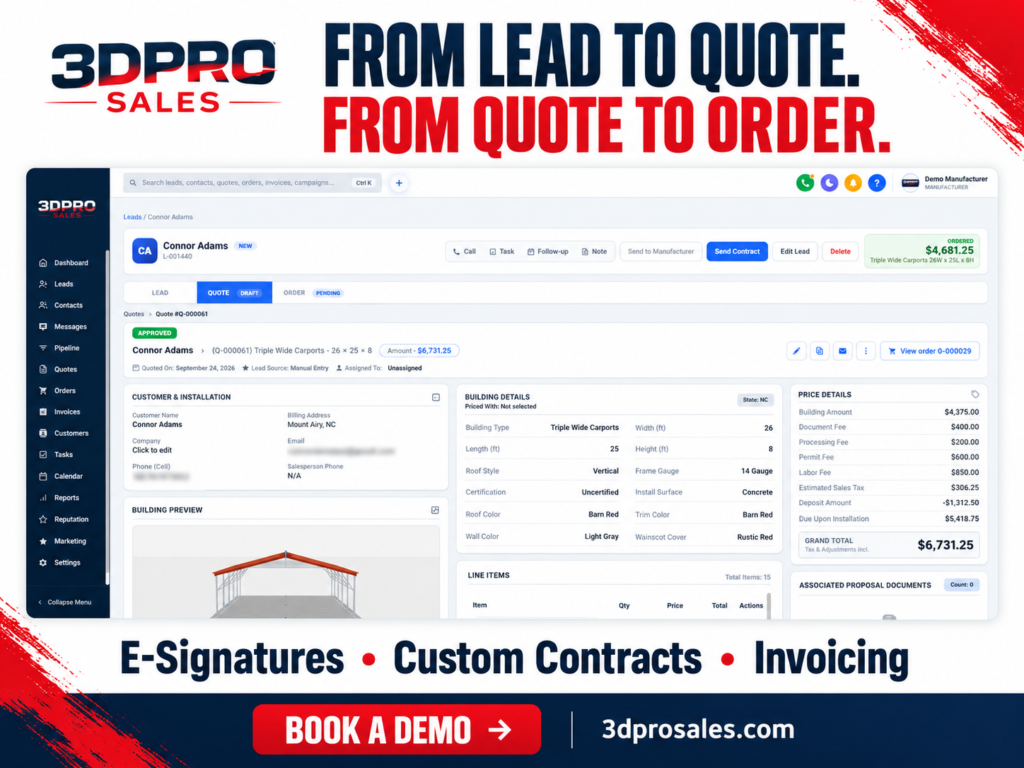
3D Pro Sales brings together an affordable 3D building estimator and a CRM for manufacturers and dealers. Customers can design a building online and request a quote, while your team manages leads, quotes, contracts, and payments in one place.
The estimator lets customers see what their building could look like. They can choose its size, colors, doors, and windows from the available options.
Customers do not see prices directly in the estimator. When they are happy with their design, they can request a quote. Your team then reviews the details and provides pricing.
The CRM helps your team organize customer information and sales tasks. CRM stands for customer relationship management.
Think of it as a shared notebook for your business. It keeps track of each customer, what they want, and what your team needs to do next.
Metal Building Sales Software for Manufacturers and Dealers
3D Pro Sales is metal building sales software for businesses that make or sell metal buildings, carports, garages, and barns.
It supports two types of businesses:
Manufacturers: Businesses that make buildings.
Dealers: Businesses that sell buildings to customers.
A dealer may help a homeowner choose a garage. A manufacturer may have several salespeople handling building orders.
Both need clear building details, organized customer records, and a way to follow each sale from start to finish.
How the 3D Building Estimator and CRM Work Together
Imagine a customer named Adam who wants a new garage.
Adam designs the garage online, chooses the features he needs, and requests a quote. Your team reviews his design, checks the details, and sends a price.
If Adam decides to buy, your team can move forward with the order, contract, and payment.
Let’s walk through each step.
1. Explore Options With a 3D Building Design Tool
It can be hard to picture a building from measurements alone. A 3D building design tool helps customers see their choices on the screen.
Depending on the options your business offers, customers can choose:
The building’s width, length, and height.
The roof style.
Colors for the roof, walls, and trim.
Doors and windows.
A lean-to, which adds a covered space beside the building.
Adam might start with a gray garage and white trim. He can then try a different roof color or add a window.
Seeing these changes helps Adam decide what he likes. It also gives your team a clearer idea of what he wants before the first conversation.
2. Request a Quote
Once Adam is happy with the design, he can submit his contact details and request a quote.
A quote explains what the customer wants to buy and how much it will cost.
The submitted request becomes a lead in the CRM. A lead is someone who may buy from your business.
Your salesperson can review Adam’s contact information and building design together. Instead of asking him to describe the garage from the beginning, they can discuss the choices he has already made.
3. Review the Design and Prepare Pricing
Before sending the quote, your salesperson checks the details with Adam.
Is the garage the right size? Does he need a larger door? Where will the building be delivered? Are there any changes to the design?
Your team can make the agreed changes, review the pricing, and prepare a quote with a clear price breakdown.
Adam receives pricing through the quote process. The estimator itself does not display prices to customers.
This gives your team a chance to understand his needs before presenting the offer.
4. Follow Up With the Customer
Some customers are ready to buy straight away. Others need more time or have questions.
The CRM helps your team keep track of where each sale stands. A customer may be waiting for a quote, reviewing an offer, or ready to place an order.
A follow-up means checking in with a customer to answer questions or offer help.
For example, your salesperson might contact Adam after sending the quote to ask whether he wants to change anything.
Keeping his information and sales progress together helps your team know what to do next.
5. Turn the Accepted Quote Into an Order
When Adam accepts the quote, your team can create an order using the agreed details.
An order records what the customer has agreed to buy.
For Adam’s garage, this includes the size, roof style, colors, doors, and agreed price.
Keeping the order connected to the quote gives your team a clear record to refer to as the sale moves forward.
6. Review and Sign the Contract
A contract explains the agreement between your business and the customer. It sets out what is being supplied and the terms both sides agree to.
3D Pro Sales includes tools for managing contracts and digital signatures. Customers can review and sign electronically.
This keeps the agreement connected to the sale. When your team needs to check the signed contract, they know where to find it.
7. Send Invoices and Track Payments
An invoice is a bill showing what the customer needs to pay.
Your business may ask for a deposit first. A deposit is a payment toward the total price. The customer pays the remaining amount according to the agreed terms.
3D Pro Sales helps your team manage invoices and track payments alongside the sale.
Your team can see what has been paid, what is still owed, and which order each payment belongs to.
A CRM for Metal Building Dealers and Their Teams
A CRM for metal building dealers helps different team members work with the information they need. Manufacturer sales teams benefit from the same organized approach.
3D Pro Sales supports roles for the people involved in the sales process.
Admins manage the business account, team access, and settings.
Sales managers oversee the team’s sales work and help keep deals moving.
Salespeople speak with customers, prepare quotes, and follow up.
Marketing staff help the business attract and understand new inquiries.
Each person handles a different part of the work. Keeping customer information organized helps the team work together.
Why Keep Building Design and Sales in One Place?
A building sale includes many details. A larger door, a different roof, or a change in size can affect what your team needs to quote.
When those details are spread across several tools, your team has more places to check and more information to copy.
Connecting building design with sales management helps keep the customer’s choices close to the work that follows.
Your team can review the design, prepare the quote, manage the paperwork, and track payments as parts of the same sale.
For Adam, that means a clearer path from designing a garage to placing an order. For your business, it means a more organized way to help customers.
Conclusion: Simplify Building Sales With 3D Pro Sales
A building design is the start of a conversation. Customers still need answers, a clear quote, and help taking the next step.
3D Pro Sales connects these parts of the process. Customers can explore building options and request a quote. Your team can review their needs, provide pricing, and manage the order, contract, and payments.
With the design and sales details together, your team can spend less time searching for information and more time helping customers.
Try the 3D building estimator to explore a design, or request a 3D Pro Sales demo to see how the platform could fit your business.
Subscribe To Our Newseletter
Services
Contact Info